
GEO STUDIO PRO 4.1.1 RELEASE NOTES
- May 23
- 3 min read
⦁ The application and Geo Format VERSION have increased to 4110 (4.1.1)
⦁ Added a new User Preference to enable or disable Hover Highlighting of Poly-Type Nodes.
⦁ Geo now makes use of Background Worker Threads for certain (potentially) lengthy scenegraph modifications. When a background task is being executed an icon is displayed in the upper icon bank (next to the Freeze flags).
⦁ When closing a loaded file - freeing of the file's scene graph memory is now done in a worker thread so that file close operations are effectively instant. Previously the app stalled until all the memory had been recovered.
⦁ If the Build Optimized Database (on load) flag is set for OpenFlight, Hie, DWB and Geo formats - Geo will performs this operation in a background worker thread resulting in the GUI becoming responsive in less time.
⦁ In addition, invoking the Make Triangle List plugin on the current selection is also executed on a worker thread.
⦁ There are two new members to the geoToolPlugin class...
bool useWorkerThread();
void useWorkerThread( bool state );
If the plugin is executing potentially lengthy operations on the model's scene graph you should add useWorkerThread(true) in the plugin comnstructor and add new/modified primitives at the RenderGroup level using geoScene::addWorkerChild( node ). The PluginMgr takes care of switching worker children into the scene graph when the plugin is complete and it is safe to do so. A plugin being executed on a worker thread must not make modifications to the current live scene graph (other than adding worker children).
⦁ There was a bug in the render traversal of NamedSwitch nodes that would result in nothing being drawn even if the NamedSwitch type (Time of Day, Precipitation etc.) matched the Header Node's environment state. This bug effected Aechelon Hie files containing Named Switch nodes and was the trigger for this dot release. This has now been fixed.
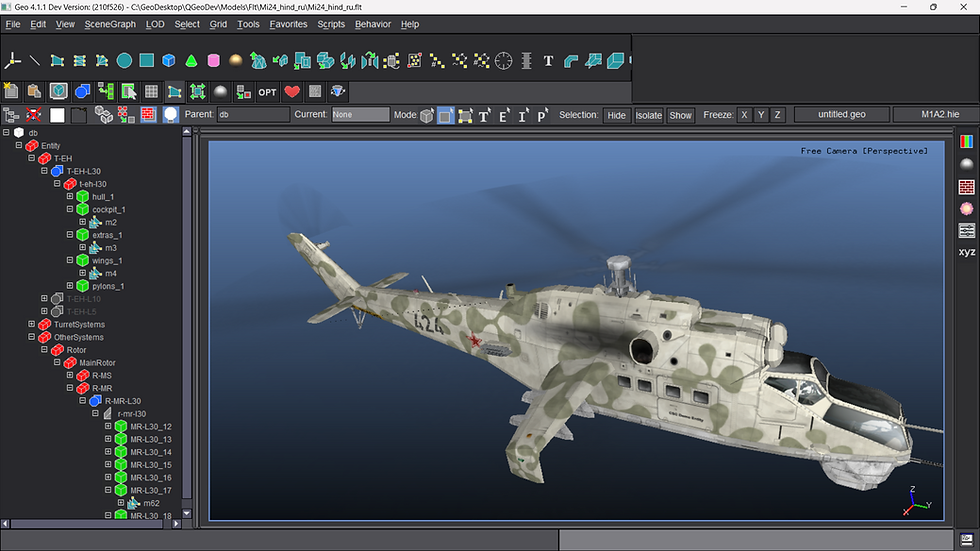
⦁ We've added a loaded files breadcrumb bar above the 3D viewports in the GUI. This provides a list of buttons showing the filenames of the loaded files. You can click on a file button to instantly switch to that file. This is much quicker than previous versions where you had to go to the File toolbar and (potentially) step through multiple files to get to a your desired file. The number of File Buttons shown will depend on your screen resolution. The image below shows Geo with four files loaded but on a monitor with only 1920 x 1024 pixel resolution...
In a situation like above (or when you've loaded more files than can be accomodated on the available GUI space) - right click on the file buttons bar and drag the mouse left and right to reveal the hidden buttons (this is the same behavior as the icon toolbars). The image below shows this...
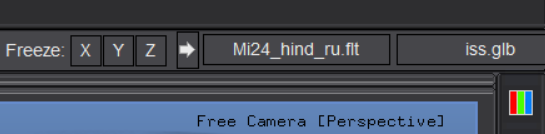
A monitor with a 2560 x 1440 resolution has enough GUI space to show five loaded filename buttons and a monitor with a 3840 x 2160 resolution will show eight filename buttons (assuming scaling is set to the Windows recommended value).

⦁ Added a Reparent menu option to the tree view right mouse pop-up menu. This will reparent the current selection to the current layer parent (if the attachment is valid) and can be more convenient (in certain situations) over drag-and-drop reparenting.
⦁ Added a Display Selection Highlight menu option to the MenuBar->Select menu. (Alt-D shortcut). This option toggles display of selection highlight in the 3D scene. The items are still shown as selected in the tree view. This can be convenient when working with large triangle-count models.
⦁ The BoxTranslate tool would show the selection highlight in the wrong (the original) position after completion if the selection was a selection of Groups. This has now been fixed.


Comments